Synopsis
“Flipgrid is a free video discussion platform from Microsoft that helps educators see and hear from every student in class and foster a fun and supportive social learning environment. In Flipgrid, educators post discussion prompts and students respond with short videos, whether they are learning in class or at home.” To learn the basics of Flipgrid, visit: https://blog.flipgrid.com/gettingstarted
In this blogpost, I will discuss the benefits of using a platform like Flipgrid to generate productive online conversations. This tool—which is freely available to educators and is fully interactive on smart phones—can help to alleviate what I would call reading and writing fatigue in the online humanities classroom. In courses where students are already expected to engage in sustained reading and writing activities, written discussion boards can often be overwhelming or unengaging. Students have already spent significant time writing essays and close-reading texts and often respond well to more interactive supplemental activities. Flipgrid offers an alternative to the traditional online discussion forum by providing students a space to record short videos—videos that can both respond to the professor’s specific prompt and/or to one another’s posts. After using the platform for a semester, I feel that it allows students to find their voices and to learn to communicate confidently in the online space—an essential 21st-century skill.
Objectives
This post is inspired by my experience with the sudden transition to online teaching in the wake of the COVID-19 disruptions. I found myself searching for ways to generate productive, community-building conversations in undergraduate literature courses—a task that can be extremely challenging in the online environment, particularly in asynchronous courses. I wanted to find a platform that was easy to use—both on my end and for the students, one that was accessible via a smartphone for those without reliable access to a computer, and something that would encourage deep engagement with the text at hand and allow students to grapple with difficult topics in a meaningful (and not superficial) way.
In previous iterations of online courses, I noticed that written discussions (via the LMS’s built-in discussion boards) were not carefully completed, and my students reported feeling tired of reading and writing. Much of the excitement of the in-person conversation about a complex and thought-provoking novel was lost, and students weren’t motivated to engage with their peers in unraveling the complicated and often difficult or challenging concepts that the literary works contained. I felt that the spark was missing from the online literature classroom.
In this blog post, I will:
Objectives:
- Introduce a platform that helps to foster a vibrant learning community in the virtual humanities classroom space.
- Demonstrate that there are alternatives to written discussion posts and forums.
- Suggest the benefits of using the Flipgrid platform for discussion-heavy classes.
Content/Instructions
Flipgrid allows you to create multiple “grids” – each one dedicated to a specific course. Here is what my home page looks like:
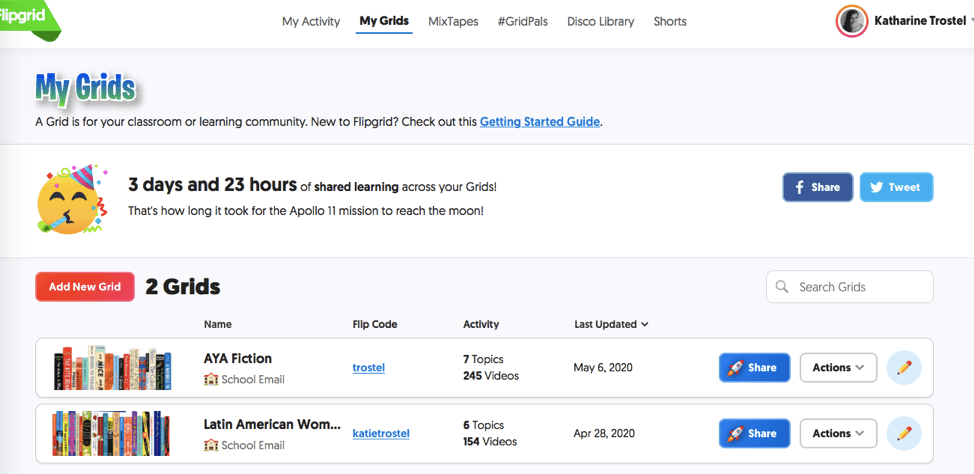
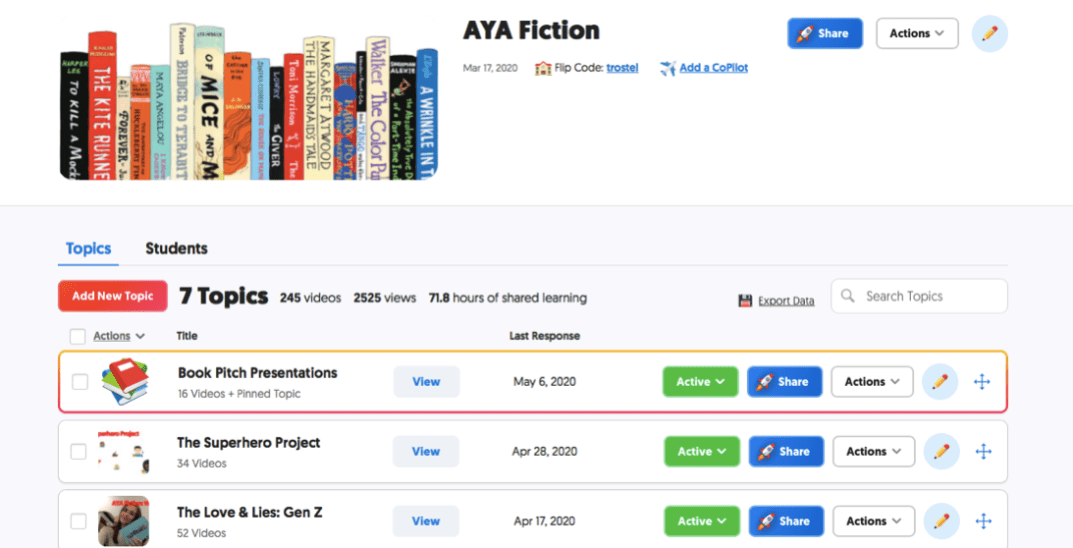
An individual “grid” contains discussion topics pertinent to the specific course that you are teaching. Students access these grids via the “flip code” (or you can send them a link or QR code.)
Zooming closer into my adolescent fiction course grid, you can see that there are seven, embedded topics:
Below, I give an example of an individual assignment contained within the topic. I was able to attach an instructional video to each of my posts that served two purposes: 1) they explained the assignment (instructional) 2) I usually read key passages from the literary works out loud—as I would in class—to highlight the importance of specific textual moments (inspirational / motivational.) Flipgrid also allows you to link out to external sources easily.
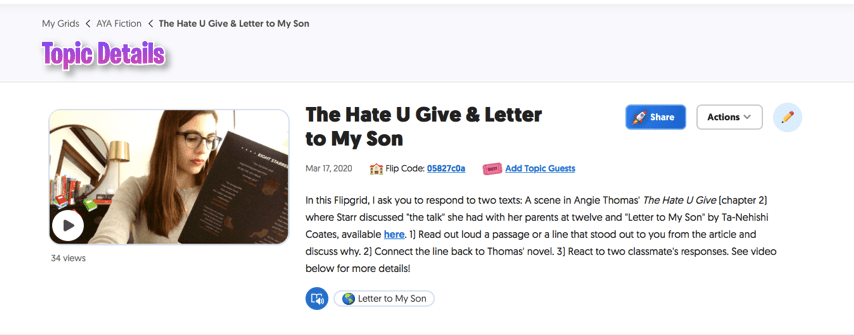
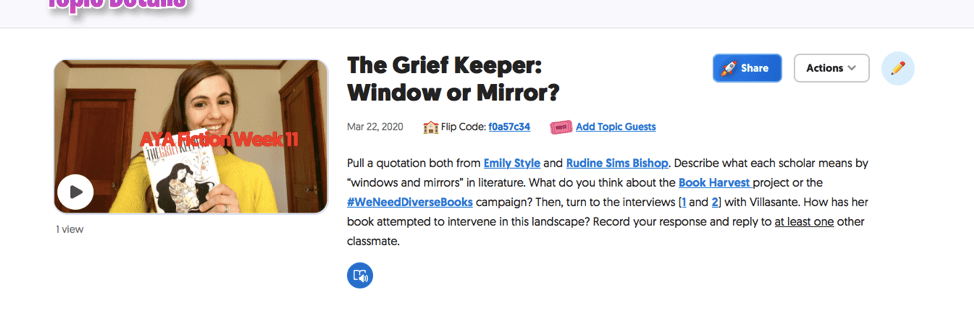
I personally found the Flipgrid discussion posts to be most helpful when very explicit instructions were given. Often, I embedded links to external readings directly in the summary. This practice also held students accountable for the assigned reading without the need for “reading quizzes” or unnecessary short papers. Students were simply required to talk about a specific passage or moment from each of the associated texts.
Positives
- This site addresses many of the challenges we might face when we are mindful of the importance of ADA compliance. The videos that are created through the site are automatically captioned and you can also download and edit these captions for accuracy. Note below that there are specific tools that allow you to easily complete these tasks:
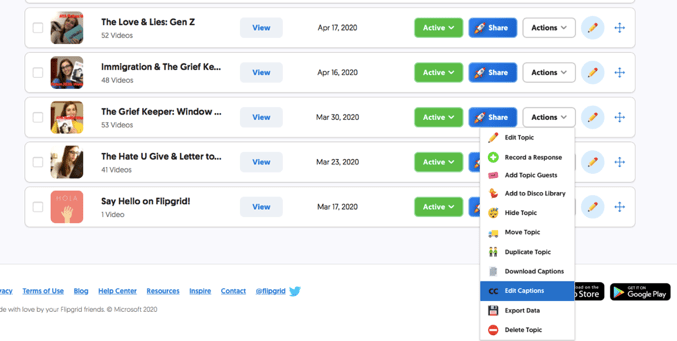
As you can see below in the screenshot, the captions generate automatically—and are fully editable should you choose to go back through and correct any errors you might discover.
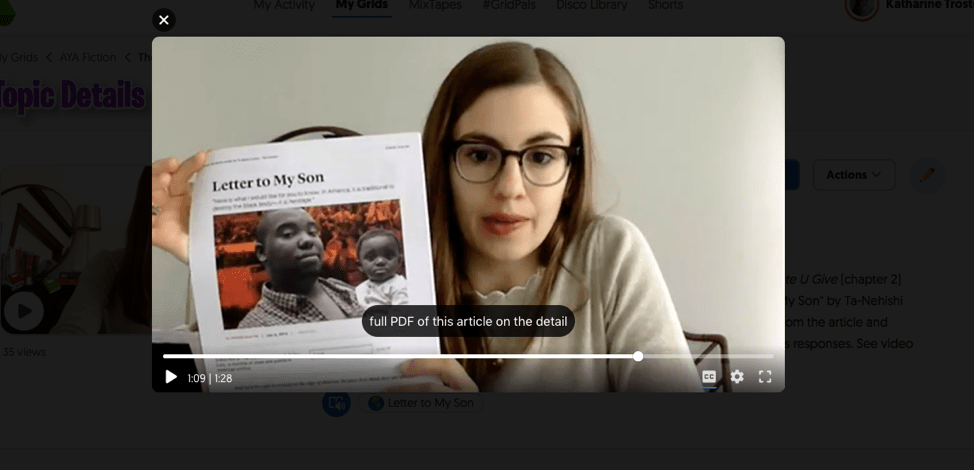
- The students responded really positively to this platform. Those who were more “camera shy” were able to cover their faces with silly emoji stickers. They could interact and see one another (and their instructor) weeks after physical distancing measures had sent us all home. I noticed that in many ways, the platform worked as an equalizer. Students who had been very quiet throughout the semester were suddenly dynamically engaging with their classmates and offering insightful feedback. However, in my opinion, the platform works best when the activity is highly structured.
- Unlike other online platforms or external tools, only the educator needs to create an account with Flipgrid. The students enter the “grid” via the educator’s “flipcode.” This avoids the problem of asking students in your class to create multiple accounts on platforms they might not feel comfortable subscribing to.
Challenges
- Like all discussion-based platforms, there is always the danger that students post content that might offend other members in the course. Something I noticed about using Flipgrid (as opposed to a traditional discussion board where students provided written commentary) was that, in general, the participants seemed to be more careful and take more time to prepare their answers. Overall, the posts were thoughtful and well-developed. I imagine that the platform itself encourages this in that the video and audio component makes it easier to connect both to our own thoughts and to the community of thinkers that is being cultivated within the online space. Students may have felt more accountable for their comments and analysis of the texts than in the online discussion posts (which I had used previously with little success and were often rushed through and dismissed as “busy work.”)
- One major challenge involves ensuring that students have access to cameras and microphones either using their computer or through their smart phones.
- A final challenge is that this type of assignment can be time-consuming. Flipgrid allows you to set a time limit for each post with a maximum of ten minutes. However, despite the fact that engaging with these videos did take a significant amount of time (I capped the videos at five minutes), I found the thoughtfulness and care that the students invested in their posts inspiring. I was very motivated to listen to their observations each week.
Rubrics/evaluation
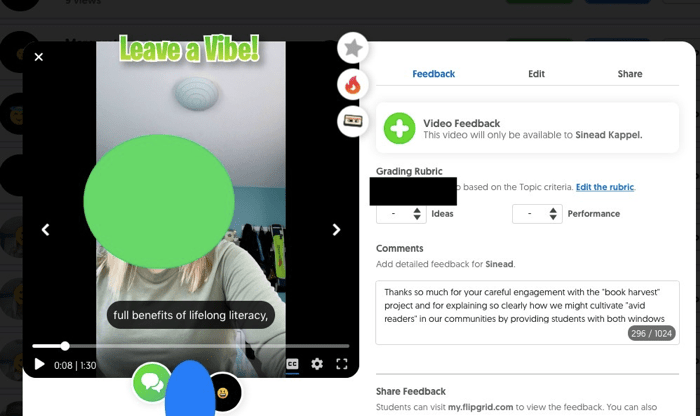
Flipgrid offers a variety of assessment options. You can associate a rubric, editable on the site, and attach a numeric score to the video directly; you can offer written feedback; you can also respond verbally via video feedback. Personally, I like to use the Flipgrid platform as a scaffolding tool. Oftentimes, the materials that I ask them to engage with in the space of the online or virtual conversation feed directly into the formal response paper. This encourages the students to take the assignment seriously and to really learn from their classmates. One thing that really surprised me after using Flipgrid was that students watched and interacted with more videos than strictly necessary. They actually took the time to watch multiple responses to find the one that most interested them before they recorded a video reply. (Flipgrid allows you to track number of views and number of minutes, hours, days, etc. of interactivity that your site has generated.)
I personally used a mix of written comments and video feedback. Students reported the benefits of seeing one another’s faces and of hearing one another’s voices—particularly during a time of enforced social isolation. Seeing my face frequently—both within the formal course shell and in these external Flipgrid exercises—helped me to maintain the relationship that I had already developed with my class and allowed us all to feel connected. Students were better able to sense my appreciation and enthusiasm for their careful work and felt validated knowing that someone was personally watching and reacting to all of their carefully considered reflections.
 HDIVE
HDIVE 