Synopsis
In this post, I will explore the crowdsourced public history application The Clio that can be found online at https://www.theclio.com/. The Clio is a collaborative history based educational mobile app and website that maps and documents thousands of historical and cultural sites and institutions across the United States. Every Clio entry synthesizes historical information about a site with images, videos, and links to source material to create a robust historical record. The Clio offers an excellent alternative to a research paper and allows students to understand what goes into the process of creating digital texts and resources. The project helps students increase their own digital literacy while also contributing to an important digital history project. The Clio offers a great option for students to adapt traditional academic writing skills to develop research-based quality content written for a public audience. This assignment helps students synthesize writing skills, secondary and primary research, and historical analysis while they interpret historically and culturally significant places and events.
The Clio Project hosts a fantastic free digital classroom feature called “Clio in the Classroom” that I have found to be quite a wonderful tool. The classroom feature allows students to create individual entries and offers a robust amount of instructional material and videos to assist students in the creation of their entries as well as instructional resources for educators. The classroom feature does not require students create an account, rather only to sign into their classroom with a single log-in. On the administrative side, there is a screen that allows the instructor to give feedback.
Objectives
I have used The Clio Project for several years in my Pennsylvania History and Digital Humanities classes as an alternative to a traditional research paper. Students can use this tool on their phone or on a computer so it is easily accessible to students without a computer or reliable internet access. I have found greater engagement with this project and more quality results as I have found my students excited to participate in a project and produce something that is part of a real public project. Also, because they are aware that they are contributing to a public forum, they seem to be more accountable with the quality of information they are creating and more attentive to citations. This past semester, I worked with a colleague and we had our students create entries for Pennsylvania Historical Markers of significant women. We came up with a list of 70 entries and when the project is complete, we will create a state-wide tour in The Clio of these sites. I have found it better to give students a list of topics or places, because all entries must be locationally based and students sometimes have difficulty selected a topic that can easily be plotted on a map.
The Clio Project Assignment consists of the following objectives:
- Students will locate and assess credible sources using digital tools. Students will also demonstrate their capacity to utilize library and archival resources.
- Students will demonstrate historical thinking skills in their research and writing, including analyzing primary and secondary sources, synthesizing information, explaining change over time, providing historical context, assessing claims and evidence, and incorporating multiple perspectives.
- Students will review and incorporate the work of scholars within their entry to provide historical context.
- Students will provide feedback for their peers and also seek feedback from peers about their work. Using this feedback, along with feedback from their instructor, students will review and revise their entry prior to submission.
- Students will incorporate facts throughout the narrative drawn from credible sources. Students will demonstrate their ability to write credible content for a public audience utilizing an advanced digital platform.
- Students will demonstrate the capacity to navigate Clio and other digital tools such as databases and search engines for conducting research online.
- Students will create entries that integrate digital media such as text, images, videos, audio files, and links to credible sources. Students will demonstrate the capacity to cite and format these sources appropriately in their Clio entry.
Objectives taken fromDavid Trowbridge, Clio in the Classroom: A Guide for Educators, accessed June 23, 2020, https://www.learningoutcomesassessment.org/wp-content/uploads/2019/02/clio.pdf
Content/Instructions
The Clio in the Classroom allows you to create specific dashboards for each class you teach. Every class has a unique login that students can use to access the class and create an entry. From the instructor side, you can see student progress in real time. You will notice that each course has “active entries,” “submitted entries,” and “saved entries.” An entry can only be made active by an instructor. No student entries will be made public while they are being constructed and edited. A student can continuously work on an entry and save it in draft form. When they are ready to submit it for instructor review or grading, they submit the entry.
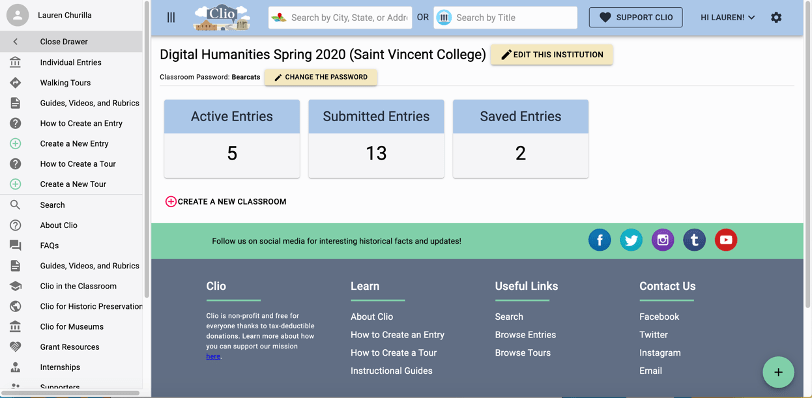
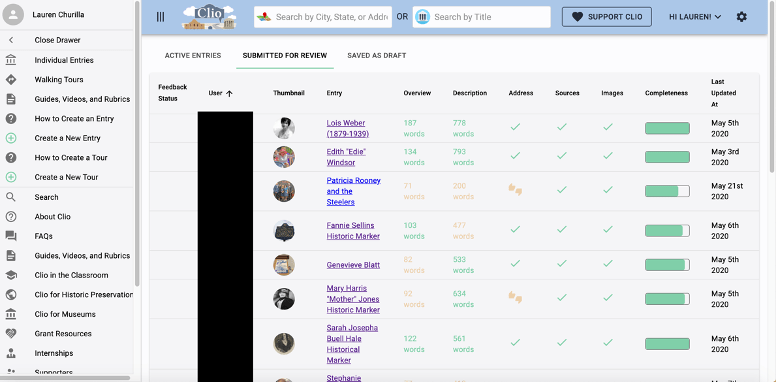
In the instructor dashboard, submitted entries show each student’s name (redacted for privacy), the topic they chose, along with the word count and completeness of all the required pieces.
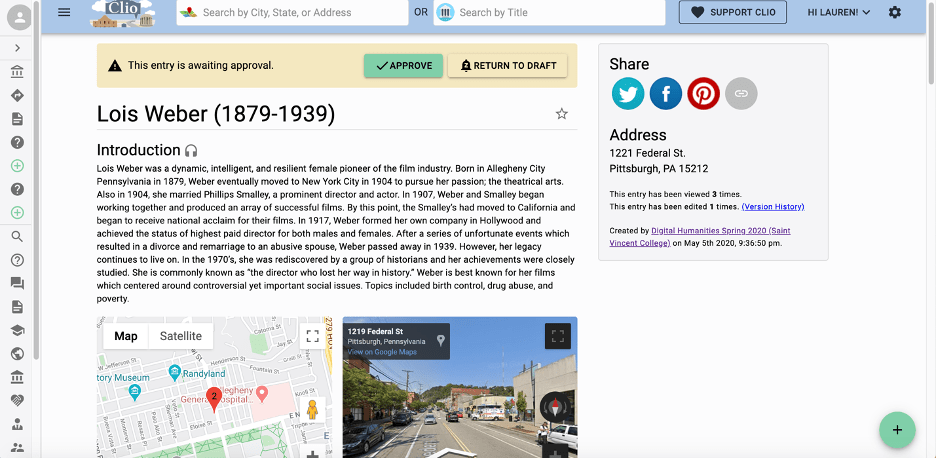
When you click on an individual entry, you can review a student’s work and make comments. There is not a good in-text editor or notation system, so I either type my comments in all caps within the text or use the “comments” tool at the bottom of the page. When an article is ready to go public, the instructor can approve it using the button at the top of the page.
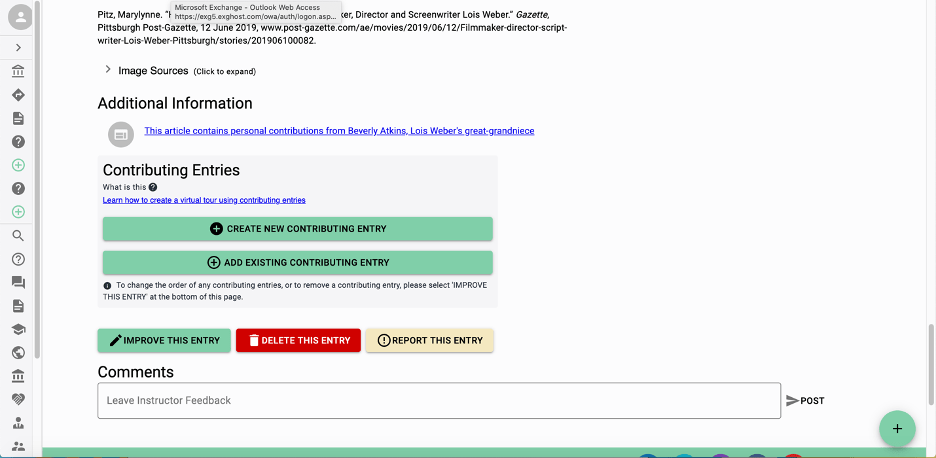
Clio in the Classroom provides a variety of related assignments that can be spread out throughout the course of a semester to extend the project. These include a topic proposal, outline, and annotated bibliography. I have used all three tools in writing designated classes and they provided a nice platform to teach about the writing process. This particular Clio Entry assignment can be done with the related assignments or as a stand-alone project. All four assignments along with the assignment instructions below can be found on the Clio in the Classroom Instructor Dashboard or at https://www.learningoutcomesassessment.org/wp-content/uploads/2019/02/clio.pdf
The assignment (adapted from Clio in the Classroom Assignment Instructions)
Overview
Every entry should begin with an overview or abstract of the topic. The Clio requires 5-8 sentences in the overview section. The overview is meant to convey to the reader the who, what, when, where, why, and how of the topic. This is not an introductory paragraph, but rather a concise overview of what the entry is about.
- Introduce your historic site or object by explaining what it is and where it is located.
- Provide a date or general timeframe for when the site gained historical significance.
- Identify some important figures or groups of people who are part of this site or object.
- Briefly state the significance of your topic so that readers better understand why it matters. For example, state how your topic notable for being associated with a specific person or event, or is the first or last remaining example of something.
- Explain whether this site or object is publicly accessible. For example, is this historic site part of a larger institution and open to the public? Is this historic marker on public grounds or alongside a highway?
Backstory
Next, your entry will need to include a substantive backstory section of 3-6 detailed paragraphs. This is equivalent to your introduction, body paragraphs, and conclusion sections if you were writing a traditional paper. The Backstory provides a rich, engaging, and concise narrative of the topic introduced in your Overview. While the Overview describes the site, the Backstory explains its history and significance in more detail. Each paragraph should contain a concise topic sentence followed by evidence to support your topic sentence. Each paragraph should address one topic.
First paragraph
- Your introductory paragraph should lead readers into a discussion of the history and significance of your topic. It may introduce key points, such as important people, places, events, and dates, which are also discussed later in the narrative.
Body paragraphs
- In two to four paragraphs, examine the important historical figures and events that took place related to your topic. Explore what led to the creation of your historic site, monument, landmark, or public art, along with important events that occurred afterward. Consider how your topic is part of broader historical narratives, such as social movements, cultural trends, conflicts, or groups of people.
Conclusion
- End your narrative by reiterating main ideas and the significance of your topic. This is a good place to explore the lasting legacy of your historic site, monument, landmark, or public art and what it means today. It may mean different things to different people, so be sure to look at your topic from a variety of perspectives.
Images
Your Clio entry must include at least three images with citations and 250 word captions. You may include a variety of images including modern and historic photographs, maps, drawings and artwork, newspaper clippings, images of items, videos, etc. Copyright is important, so be sure you are using images with permission. Some historic and modern photos are in the public domain, meaning without copyright. Other images may be only used for educational purposes, which would be acceptable because Clio is educational. Always check with the source before uploading images.
Sources
It is very important to include your citations in the source section. Clio has an automatic citation tool that will help you create an alphabetized bibliography of all sources you used.
Links
Add links to books, websites, videos, or any information you think is interesting and would be useful for a viewer to see that you did not include in your visuals.
Positives/Challenges
Positives
- The course dashboard and singular login are great to keep everything organized and allow you to see real time editing and creation of entries. I have found this is helpful for identifying student’s issues early on which allows for a good discourse back and forth that allows students to edit and adjust entries in a manageable way.
- There are so many easy to use short instructional videos and handouts that can be sent to students included in the Clio in the Classroom module.
- Excellent and timely support in case any issues arise.
- Only the instructor needs to create an account. Students only need to have the course login information.
Challenges
- It can be difficult to add edits and notations within your student entries. The comments section is nice, but does not allow you to annotate text.
- I have found that students have difficulty citing images and often do not include image citations or captions. In the future, I would spend more time instructing students how to do this.
- In spite of the requirements to select academic sources, many students continue to rely on tertiary sources and are reluctant to include secondary and primary material into their projects.
- Many entries require at least some editing before they are approved to go live.
Rubrics/evaluation
The Clio offers editable rubrics and evaluations as part of the classroom package. For my assignment, I incorporate the rubric categories into a digital rubric on my LMS. I am able to then add in any writing assessment categories or core objectives specific to my department by doing this. I have also found it useful to have my students submit a draft and then schedule a time to talk with me one on one so we can look at the entry together and discuss strengths and weaknesses. This has resulted in engaging discussion and higher quality completed entries.
 HDIVE
HDIVE 