This blog post provides a basic introduction and tips on how to organize a course site on an LMS to facilitate on-line/hybrid instruction. The primary goal of the of set up described here is to reduce the amount of time your students spend trying to find things and figure out what you want them to do and maximize the amount of time they spend engaging with course materials and working toward your learning objectives. This post includes a set of objectives, instructions and tips (with screenshot examples) for organizing your course site, some positives and some challenges to applying this approach, and a brief checklist to help you assess whether your course site is organized to be easy for students to navigate. It also contains a link to a video in which the author talks about this approach and shares some additional context and insight.
Objectives
- Readers will learn about a structure for organizing a course site to make it easy for students to find materials and follow the lesson instructions.
- Readers will identify factors that make it easy for students to find and follow materials so they can adapt this approach to their own courses.
- Readers will weigh the costs and benefits of reformatting existing course sites to facilitate online/hybrid instruction.
Content/Instructions
Guidelines and Tips for Online/Hybrid Course Site Organization
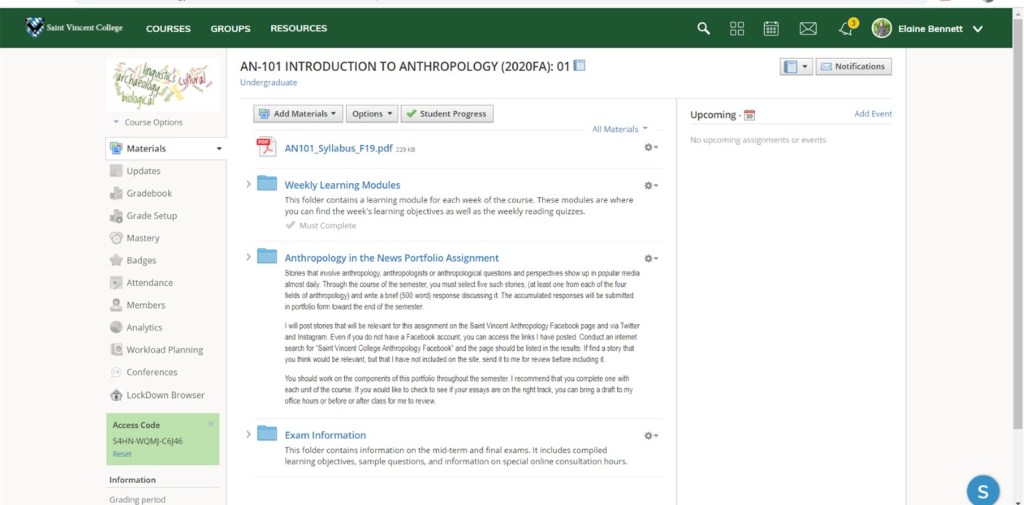
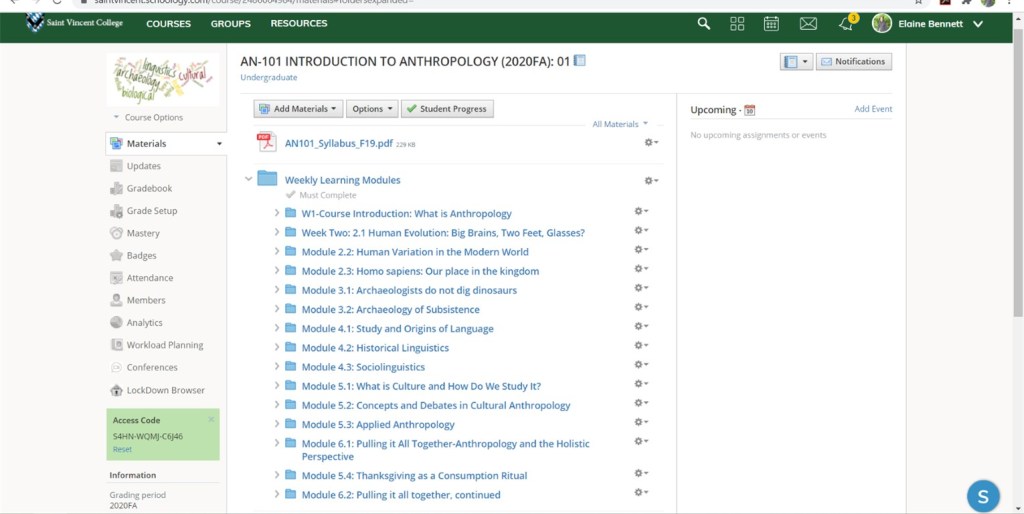
- Have specific files or folders for the syllabus and major assignments on the course main page so students can access them independent of lesson materials. Keep these near the top of the course main page and start the module folders immediately after them. (You may also consider having a specific folder to contain the module/unit folders as subfolders.) In the example below, I have a fairly minimal course home page that contains the syllabus, a folder for my weekly lessons (which I refer to as modules in this course), a folder for documents related to a portfolio assignment, and a folder for information on course exams. In the second image, the “Weekly Learning Module” folder is expanded and you can see that there is a sub-folder for each week.
- Organize the course into units or modules and make a folder for each.
Most of my courses are organized according to weeks—I divide the topics such that each should be covered in a week with readings, a lesson, and a quiz. Sometimes lessons go over my allotted time and I am often half a week behind, but I keep the dates for the online materials consistent and students do well with this. This approach can also be used for different lengths of time (a unit in one week or two weeks, or two per week) but I find that the weekly organizing strategy is both manageable for me in terms of planning and maintenance and reasonable for students.- Give each unit/module folder a clear and specific title—this will be the label in the web-browser tab when your students open the folder and will make it easier for you and your students to navigate having multiple tabs open while working.
- Place the unit/module folders on the course main page or in a dedicated folder on the course main page. As a rule of thumb, the fewer clicks a student has to make to access your lesson materials, the better. Folders within folders, within folders can be difficult to navigate. I like to set up my module folders (whether on the course main page or in a dedicated unit/module folder), organizing them so that the most recent module is at the top and scrolling down takes students through a journey of past materials.
- Decide when you will make the unit/module folders available to students. Depending on your course, you may want to release (“publish” in Schoology terminology) unit/module folders weekly or all at once. Weekly allows you to control the speed with which students complete the coursework, releasing everything all at once allows them to look and possibly work ahead.
- Include all materials needed for a unit/module in the folder so students do not need to click around to find things.
- In the classroom, we create the structure around our lessons as we tell students what is coming up next and what to look at in the syllabus. Often, the LMS site is a supplement (“Go to the readings folder to find this reading.” “Go to the syllabus document to check the syllabus.”) An online or hybrid course relies heavily on the course site for delivery of course material; accordingly, having everything for a lesson in one place makes it easier for students to keep track of things.
- This can also help to facilitate student use of a course site in fully face-to-face courses.
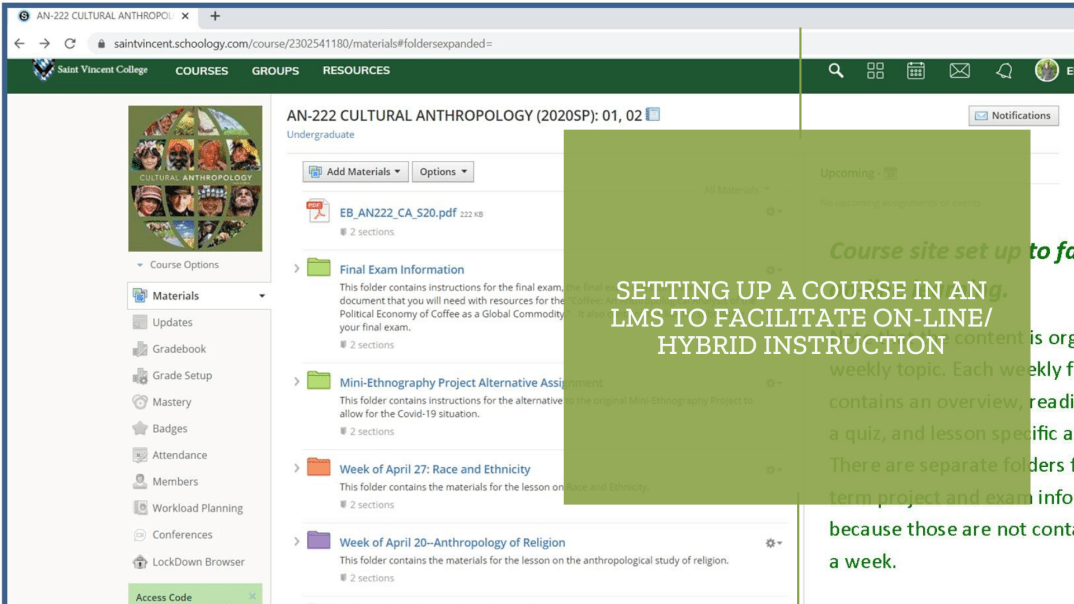
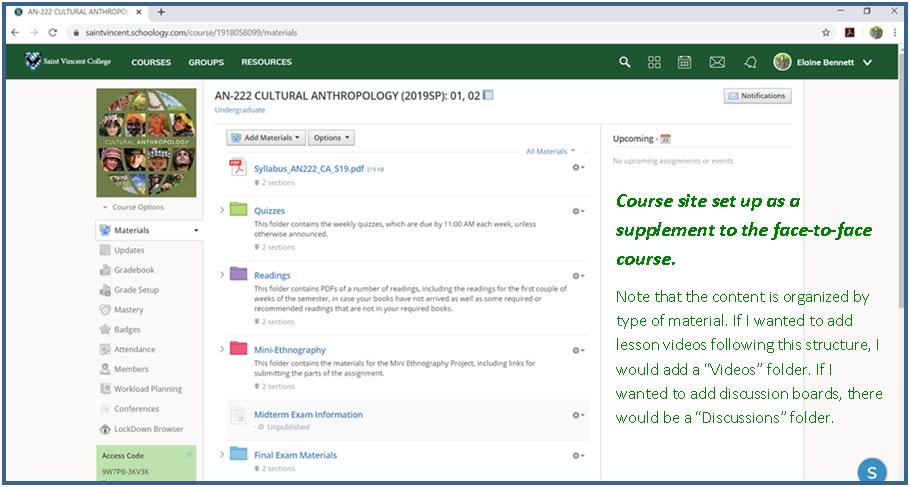
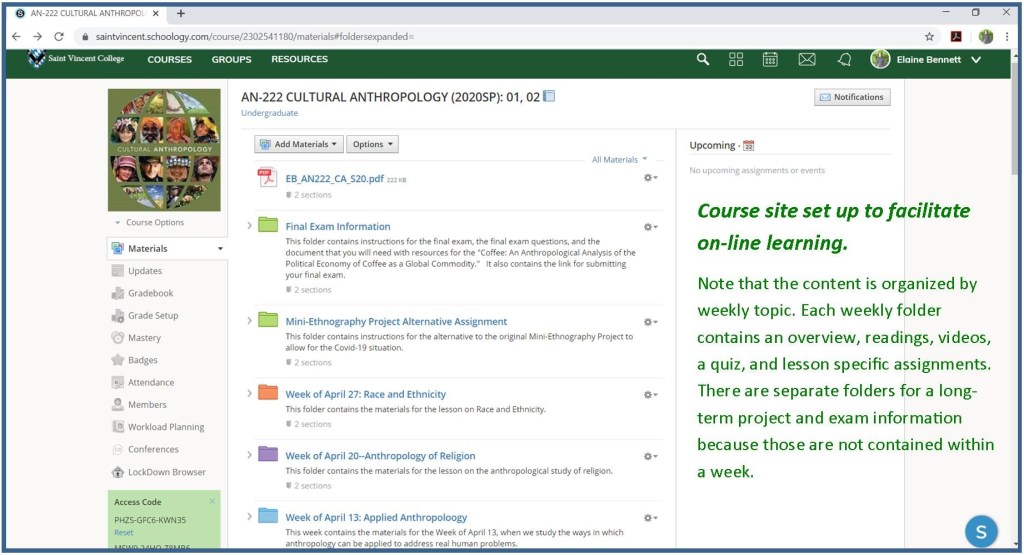
Below is an example from the course site for my Cultural Anthropology course. I had always taught this course in a face-to-face format and the students accessed the course site to take reading quizzes, find some readings that were not in their textbooks, submit assignments, and access course documents in digital form. I redesigned the course site when classes shifted to an online format in spring of 2020. The first image is the course site when I was only using it as a supplement to my in-class course. The second image is the course site redesigned to facilitate on-line instruction.
- Have an overview page in each unit/module folder that:
- Includes a brief introduction to the topic (one or two sentences). If you have an image that is eye-catching and relevant to the topic, it can help to include that here too.
- Lists the learning objectives for the module (What do you want students to learn from this lesson? What do you plan to test them on?)
- Lists the contents of the module folder. (“In this folder, you will find”…then include a bulleted list of any documents, quizzes or discussion boards, videos, etc.)
- Provides step-by-step instructions for completing the module. For example:
- 1) Review the course learning objectives (Overview page)
- 2) Do the readings listed in the syllabus. (“Title of Reading 1” is in your textbook, “Title of Reading 2 is a pdf in this folder”) Complete by [day].
- 3) Take the quiz (“Title of Quiz” included in this folder). Complete by [day].
- 4) Make your first discussion post in “Title of Discussion Board.” Complete by [day].
- 5) Respond to 3 of your classmates’ discussion posts in “Title of Discussion Board.” Complete by [day].
- In your overview instructions, consider just including the day of the week and the time, rather than the full date, (e.g., “Complete by Monday at 10:00 PM). This way, you do not have to change dates in multiple places the next time you teach the course. When you set up the quizzes, discussion boards, and assignments, you will have to select specific due dates and times, and these should generate notifications of those dates for your students. These need to be shifted every semester, but it makes it easier if you do not also have to adjust the text in other parts of the site.
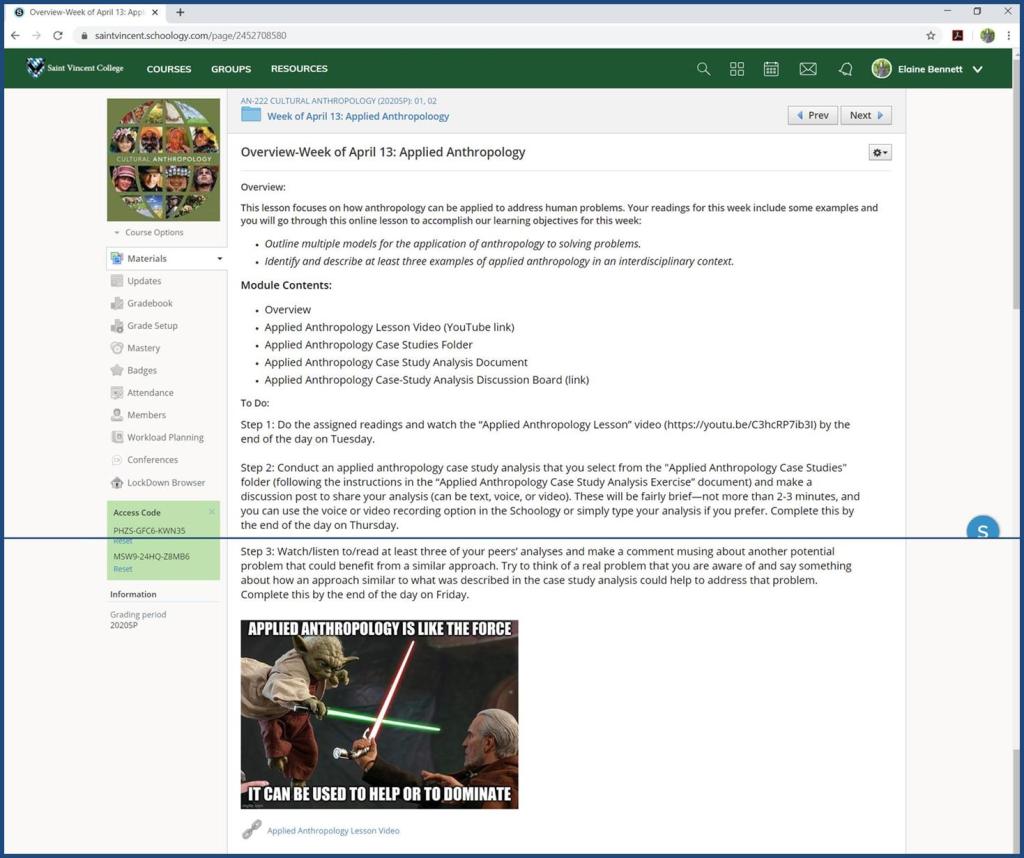
The screenshot below is a typical overview page for one of my on-line modules. Sometimes I use different colors or fonts to emphasize certain parts. It is also possible, in some LMSs to embed files and web-links in a page like this. Schoology, which is the LMS we use at Saint Vincent, has some formatting limitations, but you can play with the options to find a format that works for you and your teaching style and objectives.
- Try to set up each module’s folder using a similar format and using similar titles for each part of the module. This makes it easier for students to follow.
- For example: The overview pages could be all labelled “Overview” with some additional information…“Overview-Week 1: Introduction to Course,” “Overview-Week 2: What is Culture in Cultural Anthropology?” Quizzes could be labeled “W1 Quiz: Syllabus and Course Organization,” “W2 Quiz: The Concept of Culture.”
- In a course where you are sharing multiple readings or links to digital materials each week, it helps to set up a subfolder for readings. In some courses, I have a “Readings” folder for each week, which includes the PDFs or links to readings that are not in physical textbooks. This also applies to other materials that may come in multiples (e.g., videos and discussion boards).
- Most LMSs also have an option for you to require that students complete one activity/assignment before moving on to the next.
Positives/Challenges:
Positives:
- The clear organization of your materials in your course site will help students to focus on what you want them to learn, rather than on figuring out what they are supposed to do.
- This approach may help you to better organize your course flow, even when you are teaching primarily face-to-face.
- While this takes an initial investment of time and effort, the folders and their contents can be recycled and modified in future semesters, ultimately saving time.
- This blog provides some basic guidelines and ideas, but the approach can be modified to match your teaching style, course needs, and available resources.
Challenges:
- Setting this up takes substantial time and effort, especially since a lot of things that you could normally just say in the classroom need to be written out (or recorded in video) in this format.
- You may need to be more deliberate and structured in designing lessons to facilitate the course site organization.
- You need to have the unit completely set up and organized at least a week in advance, so you can release it to students on time.
- This approach to online/hybrid teaching works best when you can set up discrete units of time and for the most part, stick to your schedule. This approach would need to be modified in courses where the instructor does not have a set schedule of topics and completes different amounts of material in each iteration of a course.
Rubrics/evaluation:
You can use the following checklist to see if your course site is set up to facilitate on-line/hybrid instruction.
Course Site Organization Checklist:
- Is my course site divided into clearly labeled modules that reflect the structure of my course objectives and content?
- Can my students access everything they need for each module within five clicks of the course main page?
- Are the modules fairly uniform in organization?
- Did I avoid putting specific dates in the text of my course pages (so I don’t have to change dates in multiple places in future semesters)?
 HDIVE
HDIVE 